


Currently, most websites for businesses, organizations, and individuals are built on templates or themes, not by directly coding HTML from scratch. This is especially true for WordPress websites. Themes make it possible to launch a professional-looking site quickly, manage it easily, and update the design without rebuilding everything.
Because of this, selecting the right WordPress theme—or changing to a better one later—is a critical decision that directly affects how your website looks, works, and performs.
This guide will walk you through why WordPress themes matter, how to select the right one, and how easy it is to change a theme when you’re ready for a refresh.
1. Why WordPress Themes Matter So Much
A WordPress theme is not just about appearance. It controls many of the core behaviors of your website.
A good theme decides:
How responsive your site is on mobile, tablet, and desktop
The overall layout of pages and posts
Header and footer structure
Font styles, spacing, and typography
Navigation menus and usability
Compatibility with plugins and page builders
Website loading speed and performance
In other words, your theme is the foundation of your website’s user experience. Even the best content and marketing strategy can struggle if the theme is poorly designed or outdated.
2. Why Most Websites Use Themes Instead of HTML Coding
Years ago, many websites were built with custom HTML, CSS, and JavaScript. While that still exists today, it’s no longer the default approach for most businesses.
WordPress themes are popular because they offer:
Faster development time
Lower cost compared to custom coding
Built-in responsiveness
Easier maintenance and updates
Visual editors and customization options
Strong community support
For business owners, organizations, and individuals, themes provide the best balance between flexibility and efficiency.
3. Key Factors a WordPress Theme Controls
When selecting a theme, it helps to understand exactly what it controls behind the scenes.
3.1 Responsive Design
A good theme automatically adjusts layouts for different screen sizes. This is critical today since a large portion of traffic comes from mobile devices.
3.2 Layout Structure
Themes define whether your site uses:
Full-width layouts
Boxed layouts
Sidebar layouts
Grid-based designs
This affects how content feels visually and how easy it is to read.
3.3 Header and Footer
Navigation menus, logo placement, call-to-action buttons, contact info, and social links are all managed by the theme’s header and footer structure.
3.4 Fonts and Style
Themes control:
Default fonts
Font sizes
Line spacing
Button styles
Color palettes
While many of these can be customized, the theme’s defaults still shape the overall look.
3.5 Performance and Compatibility
Well-built themes load faster, follow WordPress coding standards, and work smoothly with popular plugins.
4. How to Choose a WordPress Theme by Industry
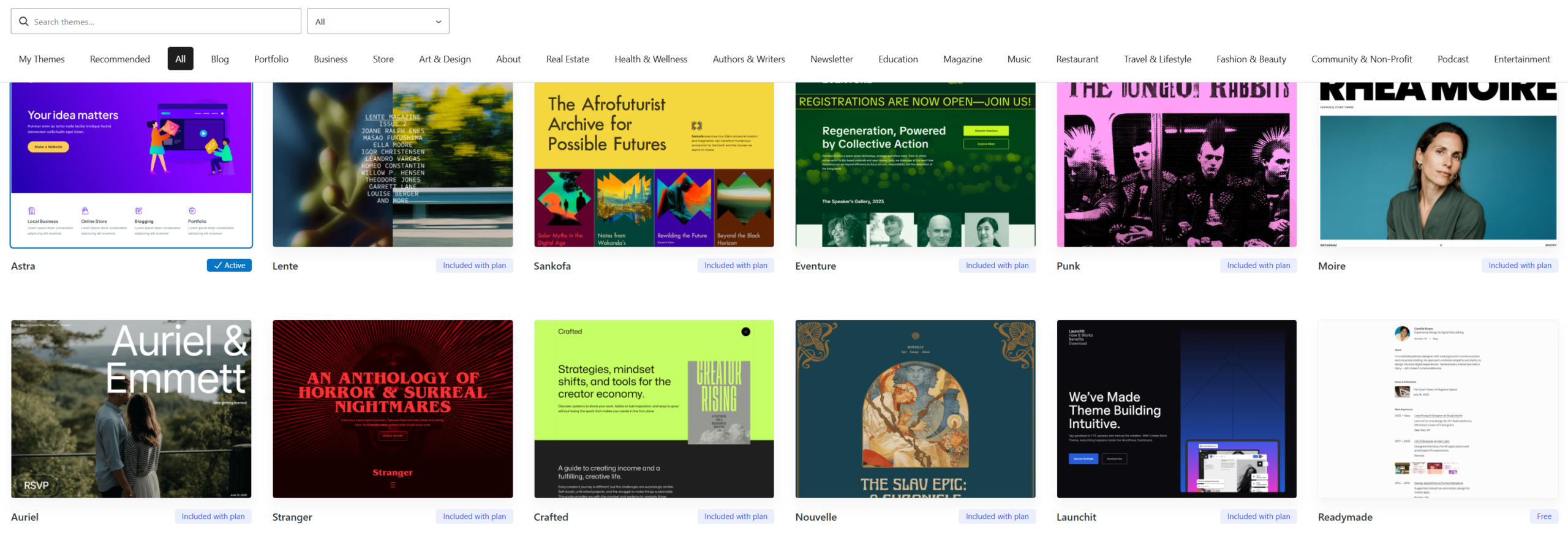
One of the easiest ways to select a theme is by matching it to your industry or business type. WordPress theme marketplaces organize themes by category for this reason.
Common theme categories include:
Blog
Portfolio
Business / Corporate
Online Store (WooCommerce)
Art & Design
Real Estate
Health & Wellness
Education
Non-profit / Organization
Example: Education Websites
If you run a school, training program, or educational organization, choosing an Education-focused theme makes sense. These themes often include:
Course layouts
Event calendars
Instructor profiles
Clean reading-focused typography
Starting with an industry-aligned theme saves time and reduces customization work.
5. Using Popular, Well-Tested Themes Is a Smart Move
Another reliable strategy is choosing a widely used and well-supported theme, even if it’s not industry-specific.
Popular themes tend to have advantages such as:
Fewer bugs and errors
Regular updates
Better compatibility with plugins
Large user communities
More tutorials and documentation
A theme that has been installed on hundreds or thousands of websites has already gone through real-world testing. Bugs and conflicts are more likely to be discovered and fixed over time.
This makes popular themes a safer and more stable choice, especially for business websites.
6. After Selecting a Theme: What Happens Next
Once a theme is installed, the real work begins.
Developers or site owners can then:
Build pages and posts
Customize layouts
Adjust fonts and colors
Configure headers and footers
Add plugins for SEO, forms, security, and performance
Optimize the site for speed and usability
A good theme provides a strong base that makes all of this easier and cleaner.
7. When and Why You Might Change a WordPress Theme
It’s very common to change themes over time. Businesses evolve, branding changes, and design trends move forward.
Common reasons to change a theme include:
The current design looks outdated
The theme is no longer supported
Poor mobile responsiveness
Slow loading speed
Rebranding or business repositioning
New functionality requirements
The good news is that WordPress makes changing themes surprisingly easy.
8. How Easy Is It to Change a WordPress Theme?
In many cases, you can change the theme and completely refresh the website’s look in just one minute.
From the WordPress dashboard:
Go to Appearance → Themes
Install or upload a new theme
Activate it
Immediately, your site will take on a new visual style.
However, it’s important to understand that:
Layouts may change
Some styling may need adjustment
Page builder templates might need review
This is why professional handling is often recommended, especially for business websites.
9. Best Practices Before Changing a Theme
Before switching themes, it’s smart to follow a few best practices:
Create a full website backup
Test the new theme on a staging site if possible
Check plugin compatibility
Review page layouts after activation
Recheck mobile responsiveness
Validate SEO settings
Doing this ensures a smooth transition without unexpected issues.
10. Theme Selection and Changes Are Strategic Decisions
Choosing or changing a WordPress theme isn’t just a design choice—it’s a strategic decision that affects branding, usability, and performance.
The right theme can:
Improve user experience
Increase engagement
Support better SEO
Strengthen brand credibility
The wrong theme can do the opposite.
11. How Bel Oak Marketing Helps Clients Choose Or Change WordPress Themes
Bel Oak Marketing helps clients:
Select the right WordPress theme based on business goals
Evaluate existing themes for performance and design
Safely change themes without breaking the site
Refresh website design while keeping content intact
Optimize layout, responsiveness, and usability
Whether you’re launching a new website or upgrading an existing one, choosing the right theme makes everything else easier—and more effective.
For more information, visit Bel Oak Marketing.